the right words make the slide
How many words should you put on a slide?
As is the case with so many things when communicating with data, the answer is: it depends.
Too many words compete for attention and make your audience work to find what matters. Too few, and you leave them to figure out for themselves what the data means and why they should care. The goal isn’t to use more words or fewer words. It’s to use the right words.
This isn’t a new idea. Years ago, my colleague Elizabeth wrote a post called words are your friend—when you choose them wisely. Her point still holds: numbers and graphs don’t speak for themselves. The words we pair with them help our audience make sense of what they’re seeing.
What is new is how often I’m thinking about this as I work with AI.
AI can write the words—but does it know what to say?
I’ve been spending a lot of time lately asking AI to create and improve graphs and slides. It can get surprisingly far, particularly when I give it context and ground it in the principles from our SWD + AI Primer. But words are one place where I find myself intervening frequently.
AI-generated slides can struggle with the balance. Sometimes they’re overloaded with text: lengthy titles, explanatory paragraphs, labels, callouts, and summaries that all compete for attention. Other times, AI strips things back so far that we’re left with a polished-looking graph and a purely descriptive title.
Neither is ideal. More importantly, AI often defaults to describing what happened rather than interpreting why it matters. That’s an important distinction—and one that becomes clearer when we look at an example.
The right words turn data into useful communication
Consider the following slide, intended for staffing managers at a call center.
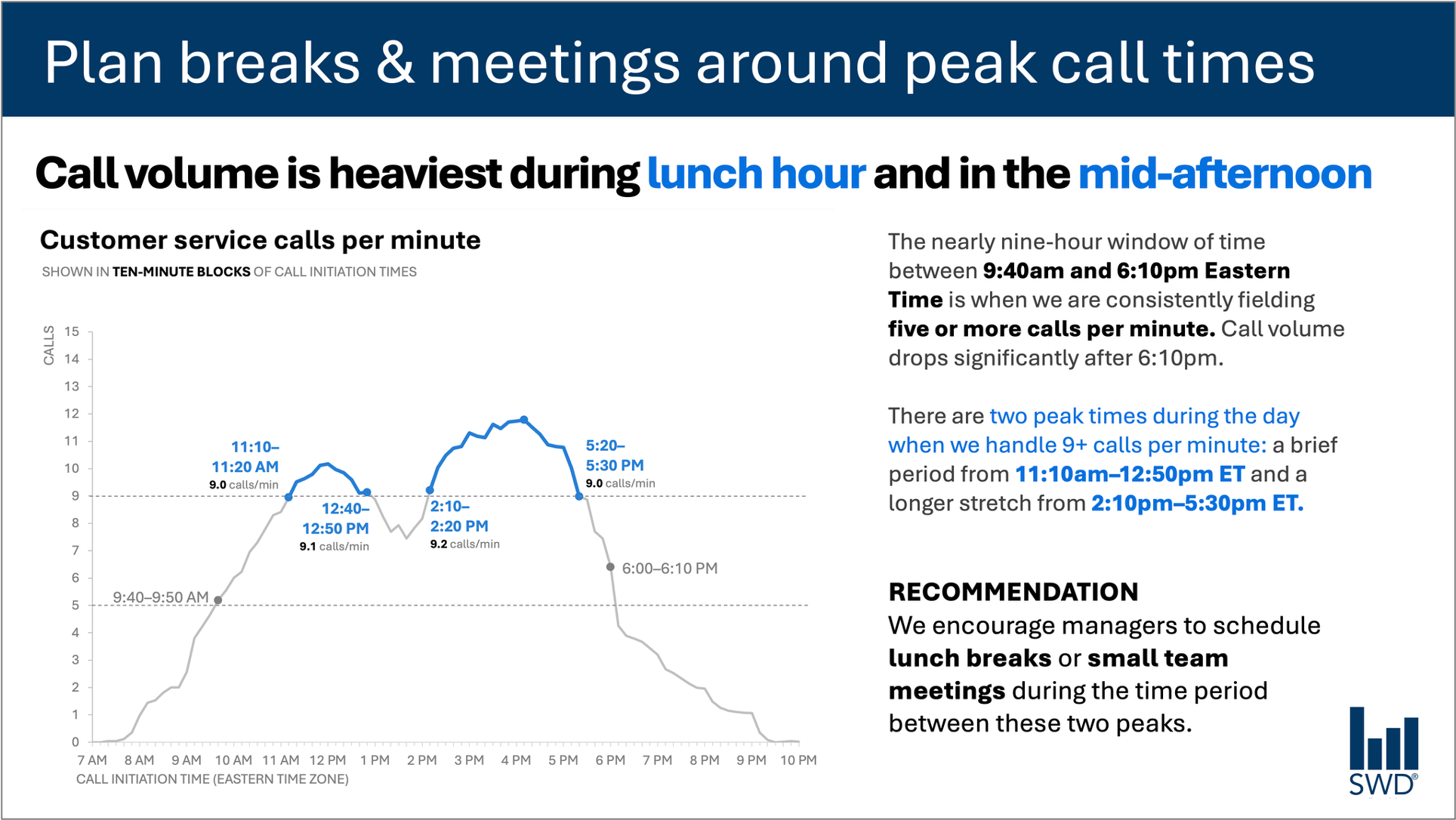
The graph shows customer service call volume throughout the day. On its own, we can see the pattern: calls climb in the morning, remain high through much of the workday, and peak around lunch and again in the afternoon.
But the audience isn’t looking at this graph simply because they’re curious about call volume. They are staffing managers. Presumably, we’re showing them this information because they can do something with it.
That context changes the words I choose.
Plan breaks & meetings around peak call times. This takeaway title tells staffing managers what matters. The descriptive graph title—Customer service calls per minute—tells them what they’re looking at. Annotations identify precisely when call volume crosses important thresholds and add useful context about the two peak periods. Finally, the recommendation translates all of this into a specific action: schedule lunch breaks or small team meetings between the peaks.
Each bit of text has a job. This is an important point. We sometimes talk about reducing words as though fewer is inherently better. It isn’t. Removing all of the text surrounding this graph would make the slide more minimalist, but it wouldn’t make it more useful. Add the right words for an effective communication.
Different words do different jobs
When you’re deciding which words belong on a graph or slide, think first about what your audience needs from them.
A takeaway title can communicate the main point or action. A descriptive graph title can orient the audience to what they’re looking at. Direct labels can eliminate the work of referring back and forth to a legend. Annotations can explain what happened, call attention to important points, or add context that isn’t evident from the data alone. Axis titles, footnotes, and source information can provide additional detail when it’s needed.
Not every graph needs all of these things. The goal is to be deliberate. Ask: What does my audience need to understand this? What should they know or do as a result? Where could a few well-chosen words eliminate confusion or make the point unmistakable?
Then get rid of the words that aren’t helping.
The insight has to come from somewhere
This is where the human role becomes especially important when partnering with AI.
Imagine giving AI the call-volume data above and asking it to create a slide. It could likely identify the pattern. It might tell us that call volume is highest around lunchtime and again in the mid-afternoon. It could probably generate a polished sentence describing that observation.
But that’s not yet the insight.
The useful recommendation comes from combining the data with additional context: Who is the audience? Why are they looking at this? What do they care about? What decisions are within their control? Once we know the audience is staffing managers, the pattern can become actionable.
That idea is central to our SWD + AI Primer: give AI the context it needs before asking it to help you communicate. AI can help us find concise wording. It can suggest titles, labels, and annotations. It can help us test different ways to articulate an idea. But someone still needs to understand the situation well enough to recognize what matters.
A polished sentence isn’t the same thing as insight.
If you’ve spent time with the data, you know things AI may not. You know the history. You know what changed. You understand the organizational context and what your audience cares about. You may recognize that one movement in the graph is consequential while another that looks equally prominent is not.
Bring that knowledge to the slide. Then use words to make your thinking visible. The goal isn’t more words or fewer words. It’s the right words, doing the right jobs.