
This is the final post in our SWD + AI series—practical guidance for using AI as a thought partner across the various stages of your data storytelling work. If you’re just joining us, check out with the first four installments: start with context, craft a story, choose an appropriate visual, and design effective graphs and slides. Explore all of our AI resources.
You’ve done the thinking. You’ve planned the story, built the slides, and designed the visuals. Now comes the part that determines whether any of it lands: the presentation itself.
Most people think that once the slides are finished, they’re ready to present. But there’s a meaningful step between finishing your materials and standing in front of your audience, and it’s one that too many people skip or shortchange: preparation and practice.
Preparation means anticipating the challenges you might encounter when you deliver your presentation. What questions are you likely to face? Who is most likely to push back, and on what? Where are the gaps in your argument that a sharp stakeholder might identify before you do? Thinking through this in advance doesn’t just reduce anxiety—it changes the quality of how you show up. You move from hoping the conversation goes well to being ready to guide it.
Practice means actually rehearsing. That doesn’t happen by reading through your slides one more time. It involves talking through your materials out loud, practicing responding to questions, and getting feedback on your delivery. Most presentations have a few moments that carry outsized weight: the opening, where you set the frame and earn your audience’s patience; the technical explanation that needs to be clear without pulling everyone into the weeds; the moment you make your recommendation. Those in particular are worth rehearsing. Historically, you might have done this with a colleague or even in front of a mirror. AI offers something different: an available, infinitely patient practice partner who can listen and offer feedback, play the role of skeptical stakeholder, ask you hard questions, and push you to articulate your reasoning more clearly.
Together, preparation and practice are how you close the gap between an adequate presentation and a confident, compelling one.
Working with AI: present powerfully
AI is useful at both stages, but in different ways.
For preparation, a text-based conversation works well. You’re doing the analytical work: anticipating objections, pressure-testing your argument, identifying gaps, and thinking through how to navigate specific dynamics in the room. This kind of structured thinking benefits from being able to read, react to, and revisit AI’s responses.
For practice, the voice interface changes everything. Rather than typing out a simulated conversation, you speak, and AI responds in real time. You can hear how your explanations land, catch where you’re unclear or over-reliant on jargon, and get feedback on your delivery.
Practice is also where it can pay to be selective. You certainly can walk AI through your entire presentation. But you can also identify two or three moments where you most need help and concentrate your practice there. Your preparation can point the way: the toughest questions you anticipate and the weak spots in your argument often line up with the sections that most need rehearsal. Focused practice gets you sharper feedback, and it lets you run the same section several times, adjusting as you go—which is how practice builds fluency.
To be clear, this isn’t about memorizing. A memorized script will fall apart the moment you forget your next word or someone interrupts. The goal is to talk through the same idea several times, in different ways, until you can explain it naturally from whatever angle the conversation demands. Then when the pressure is on, you have those reps to stand on.
Before getting to the prompts and examples, let’s review some pitfalls to be aware of at this stage.
Things to watch out for:
AI will anticipate generic objections—it knows the kinds of questions that come up in business presentations, but it doesn’t know your specific audience. Give it as much context as you can about who will be in the room and what they’re likely to care about. The more specific you are, the more useful the preparation will be.
AI may make your presentation feel fragile—a long list of potential objections can be demoralizing rather than useful. Prioritize. Ask AI to help you identify the two or three questions that are most important to prepare for, not every possible challenge.
AI won’t give you the harder pushback a real human might—the skeptic who interrupts, the question asked in bad faith, the comment that’s technically a question but really a political statement. Practice with AI sharpens your clarity; it doesn’t fully replicate the interpersonal dynamics of real life.
AI voice feedback is general, not expert—it can tell you that an explanation was unclear or that you used a lot of jargon, but it isn’t a communications coach. Use its feedback as a signal to notice and adjust, not as a formal assessment.
Long run-throughs get general feedback—if you talk through twenty minutes of material, AI’s feedback will tend toward broad impressions. Short, focused segments get specific, usable feedback.
Don’t let the feedback substitute for actual rehearsal—the goal of practice isn’t a perfect score from AI. It’s command of your material. Keep going until the ideas feel natural and you feel comfortable, not until AI says you’re ready.
Be mindful of what you share—avoid including sensitive data, personally identifying information, or confidential business details in your prompt or conversation.
Potential prompt: prepare for your presentation
Use this prompt as part of of your preparation—after your slides are built and you have a clear sense of your argument and your audience. You can also upload your slides to give AI more context, but be clear that you’re looking for help anticipating questions and challenges, not feedback on slide design.
I’m preparing to present [brief description of what you’re presenting and to whom]
My recommendation is [your Big Idea or core recommendation]
The key stakeholders in the room are: [describe each person briefly—their role, what they care about, and any anticipated concerns or dynamics]
Help me prepare in two ways:
First, anticipate the hardest questions I’m likely to face. For each key stakeholder, identify the one or two questions they’re most likely to ask—particularly those that could be difficult to answer, challenge my recommendation, or risk derailing the conversation.
Second, identify the two or three places in my argument where I’m most vulnerable—where the logic is thin, the data could be challenged, or where a reasonable person might simply disagree.
Ask me any clarifying questions about my audience or the context before you begin.
Potential prompt: practice with AI voice
This one works differently from the other prompts in this series. Before you start, choose the parts you want to practice—for example, your opening framing, a technical explanation, your recommendation, or your response to an objection you expect. Then start a voice conversation with your AI tool of choice using the following setup. If you’re continuing a conversation where you’ve already shared your presentation or Big Idea, you can skip repeating that context.
I’m going to practice one part of a presentation with you. I’d like you to listen while I walk through it, then give me feedback.
Here’s some context before I start: [briefly describe your presentation, your audience, and your recommendation]
The part I’m practicing is: [the section—for example my opening, where I set up the problem and ask the group to hold questions until the end]
What this part needs to accomplish: [its job—for example, get skeptical stakeholders to hear me out before raising objections]
The feedback I’m most interested in is: [choose the item or items that matter most to you]
Message clarity—listen for whether my main point is obvious and whether my reasoning and recommendation come through clearly.
Word choice—note any jargon, technical language, or explanations that are more complicated than they need to be.
Filler words—count or note how often I use um, uh, you know, like, or other fillers and where they show up most.
Pace and pausing—notice if I rush through anything or skip past key points without giving them time to land.
Timing—tell me how long this section took and whether I spent too much or too little time on any part, given what I’m trying to accomplish.
Vocal variety—listen for whether my delivery stays engaging or becomes flat or monotone, and whether I vary my tone and emphasis to signal what matters most.
Momentum—notice if the story flows naturally from one point to the next, or if there are places where the thread is lost, the logic feels jumpy, or the audience might get left behind.
After confirming your AI partner understands their role, talk through that section as if you’re delivering it to your audience. Revise based on the feedback and run through it again. Once it feels natural, move on to the next part you want to practice.
In practice: present powerfully
If you’ve been following this series, you know the scenario. I’m a People Analytics Manager at a mid-sized consulting firm, and I’m about to present a recommendation to change our hybrid work policy. The slides are built. The story is planned. Diana, our CPO, is my primary audience, but Marcus (COO, skeptical of any policy change) and Robert (CFO, focused on cost) will both be at the meeting. Priya (Head of Talent), who championed the current policy, will also be paying close attention.
This presentation matters. The data is solid, but the room is complicated.
Prepare: anticipating the hard questions
I turned to Claude to help me think through what I might face. I shared the following.
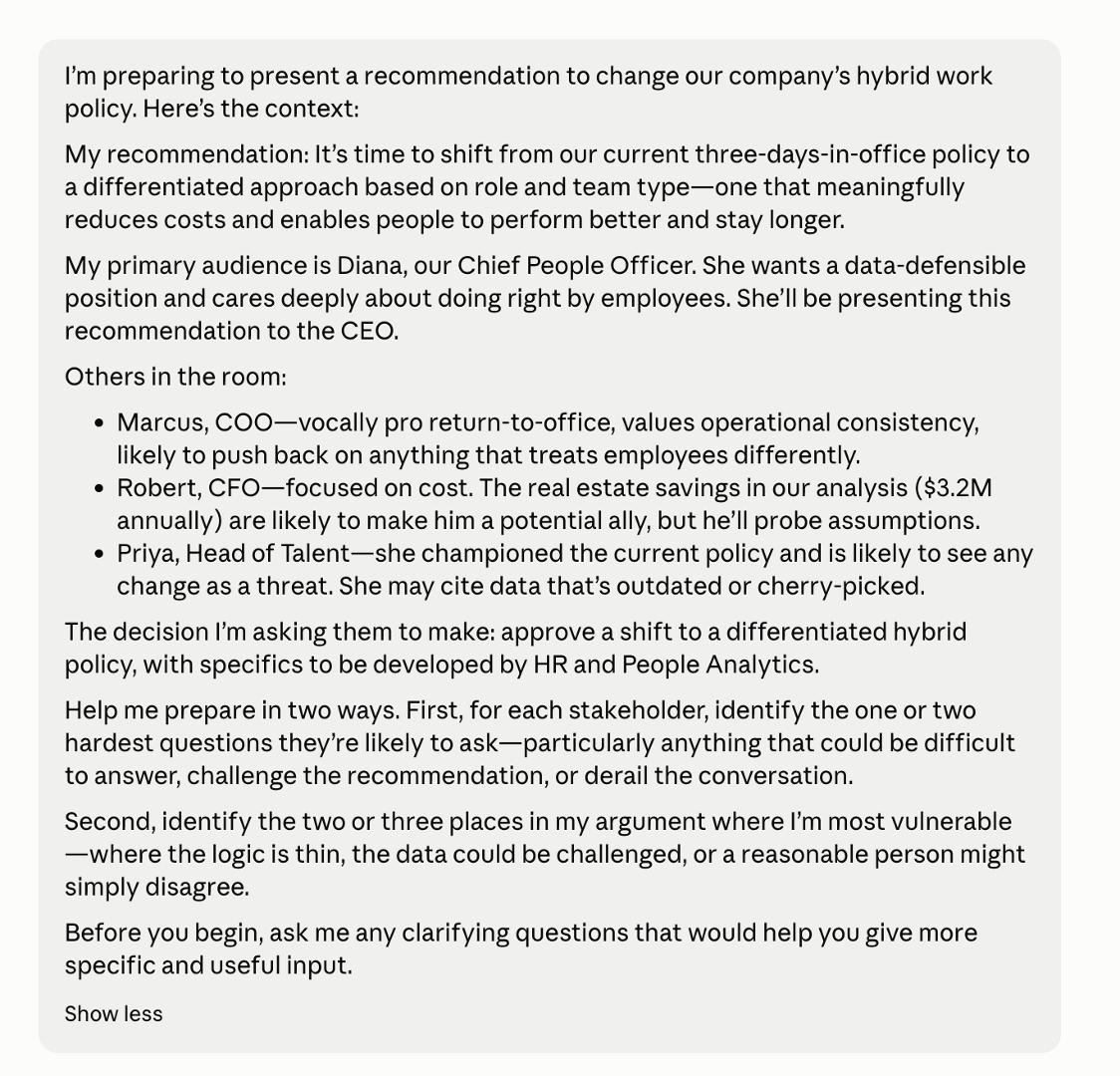
Claude’s first response wasn’t the stakeholder analysis—it was a set of clarifying questions, which I’d asked for. But they were mostly about my analysis: how the savings were calculated, what data supported the retention claim. Reasonable questions, but I’d already stress-tested the analysis. What I needed was help seeing it from my audience’s side. So I pushed back and asked how those questions would help me anticipate what the people in the room might raise. (Lesson learned: I’ve updated the potential prompt earlier in this post to raise any clarifying questions about your audience and context, so you can skip this detour!) If you’re continuing a conversation from earlier steps, you’ll be less likely to encounter questions like these.
That redirect produced something much more useful.
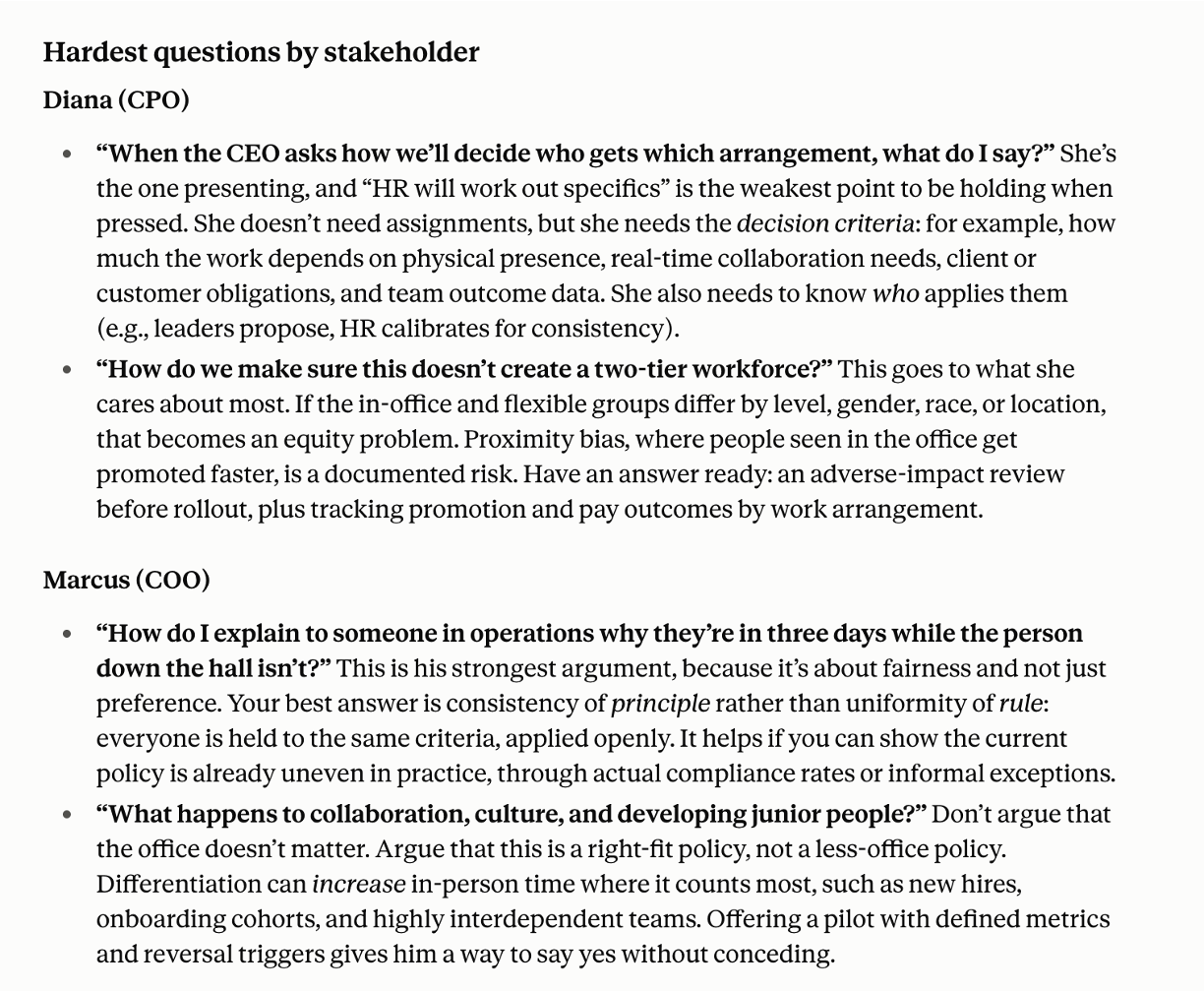
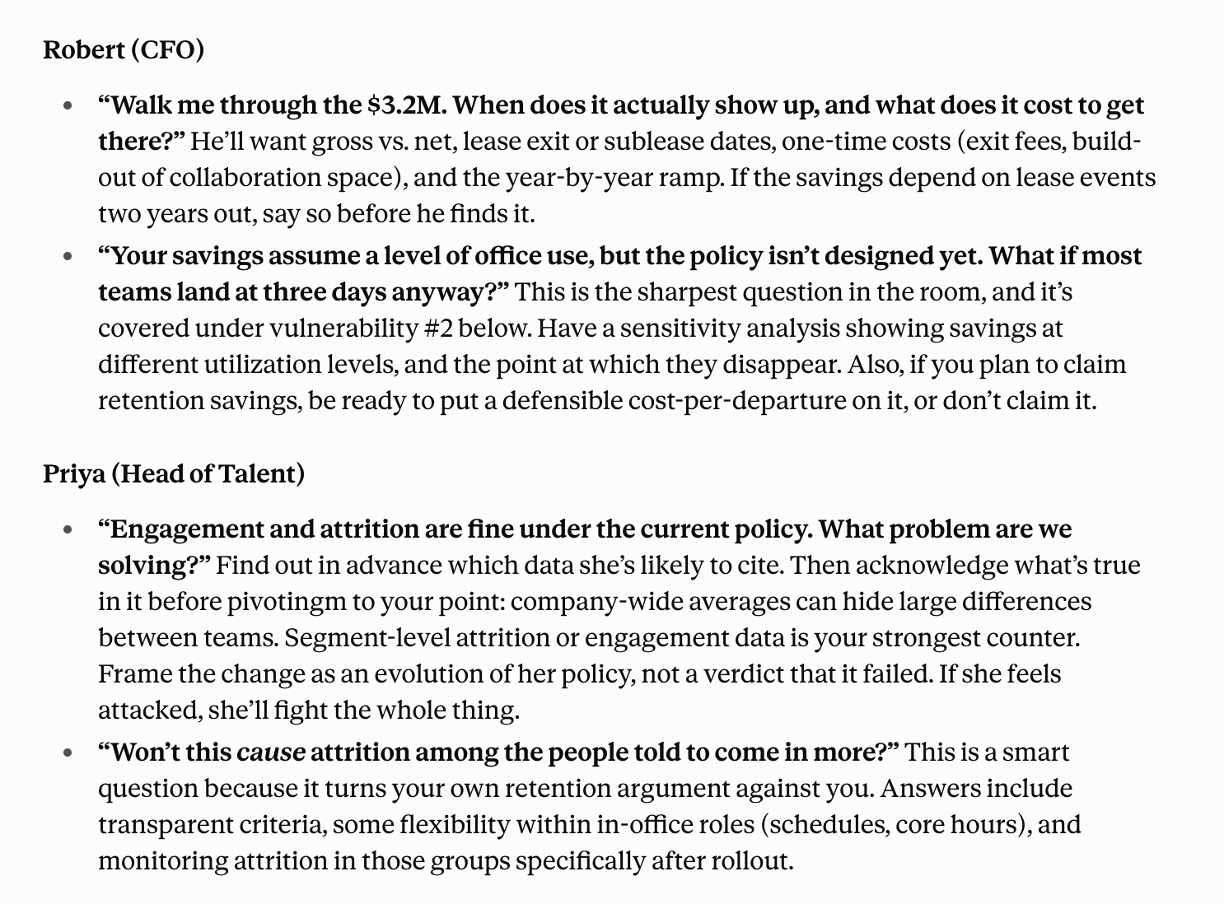
The hardest questions by stakeholder were specific and credible—the kind of thing each person actually would say, not generic executive pushback. Diana’s toughest moment won’t be the recommendation itself; it’ll be when the CEO asks how decisions get made about who gets which arrangement, and she’ll need more than “HR will work out the specifics.” Marcus’s strongest argument isn’t that he prefers the office—it’s a fairness argument, and it’s harder to dismiss. Robert will want to see the $3.2M built up from assumptions he can challenge, not a headline number. Priya’s sharpest move is to turn the retention argument against itself: Won’t this cause attrition among the people told to come in more?
What made this useful wasn’t that Claude told me things I didn’t know. It was that it forced me to think through how each person would experience the presentation—as a proposal that affects their priorities, their relationships, and their standing within the organization.
The vulnerability analysis was also strong, but one point stood out above the others. The first two vulnerabilities were about evidence: the performance claim might be too strong, and the request is underdeveloped relative to the savings it promises. Those are fixable with preparation. The third was different:
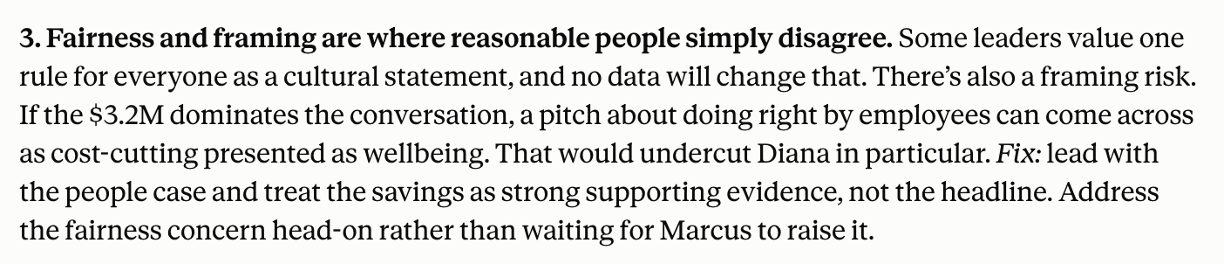
That’s the kind of thing that’s easy to miss when you’re close to your own material. I knew the savings were supporting evidence, not the headline. But I hadn’t thought carefully about how easy the conversation could drift toward cost-cutting, especially once Robert engages. Recognizing that risk before presenting gives me a chance to plan for it, rather than having to respond in the moment.
With the tough questions identified and my vulnerabilities mapped, I had something more useful than confidence—I had a plan for when things get hard. The next step was to practice actually saying it out loud.
Practice: rehearsing out loud
I switched to ChatGPT Advanced Voice for this phase. It’s widely available and its voice mode is mature enough to give genuinely useful delivery feedback. Any AI tool with a voice interface will work; I’d encourage you to use whichever one you have access to.
For my practice, rather than run through the whole presentation, I picked three moments my preparation had flagged as the riskiest and worked through each one separately.
One thing worth noting before I get to the details of the voice session: simply getting ready to practice made me better prepared to present. Deciding which parts of the presentation to focus on, thinking through what each one needed to accomplish, getting clear on what I wanted to say—by the time I opened ChatGPT, I was already more ready than I would have been otherwise. The feedback from AI sharpened things further.
I started by giving AI the context—the presentation, the audience, my recommendation—then told it which part I was practicing, what it was meant to accomplish, and what I wanted AI to listen for.
The opening. At least two people in the room are likely to push back early: Marcus (COO) who favors a consistent return-to-office policy, and Priya (Head of Talent) who championed the current one. If either jumps in during the first few minutes, I’ll spend the meeting defending my recommendation instead of making the case for it. The opening has a specific job: acknowledge what the current policy got right, be clear about what I’ll be asking for, and earn the room’s patience to hear the full argument before weighing in. I asked AI to listen for message clarity and momentum. Would a skeptic hear a reason to wait, or an opening to interrupt?
The financial case. This was the section I expected to be hardest to talk through. The $3.2M in annual real estate savings rests on several assumptions—lease timing, office utilization, one-time costs—and Robert (CFO) could probe any of them. My instinct was to explain them all, which is exactly how a presentation ends up in the weeds. It also marks the shift from the people case to the dollars, and I suspected that transition looked cleaner in my notes than it would sound. I asked AI to listen for word choice and pace: where I overexplained, where I lost the thread from one point to the next, and whether the headline number had time to register.
A tough question. In preparation, AI had flagged a question from Priya that could turn my own argument against me: if part of the case is that flexibility helps people stay, won’t this drive attrition among the people asked to come in more? It’s a fair question, and since she championed the current policy, I’d expect it to come with an edge. I have data that speaks to it, but data-backed answers carry their own risk: it’s easy to answer a pointed question with a wall of numbers. I asked AI to play the Head of Talent: ask the question, listen to my answer, push back once the way she might, and then tell me whether my answer was clear, well-supported, and free of defensiveness.
Taking into account the feedback across all three sections, a few things stood out.
The opening feedback confirmed what I had hoped: the acknowledgement of the current policy was clear, and the tension was evident. AI also caught something worth improving: how I asked people to hold their questions. I’d framed it as a request, which might come across as defensive. The suggested reframing—giving the audience a reason to wait rather than asking them to—is a small change with a real difference in how it comes across. I also hadn’t thought carefully enough about what “approval to move forward” actually means to someone hearing it for the first time. A skeptic hears a vague request as an opening, not a commitment.
On the financial case, the feedback I found most useful was the simplest: pause after the number. I knew that in principle. Hearing it flagged in the context of my own delivery made it concrete. The suggested transition—”The people data tells us where our current policy isn’t working; the financial data gives us another reason to act”—is also stronger than what I had. It connects the two arguments rather than just announcing a new one.
The mock Priya exchange produced the most helpful observation of the session, which came at the end: “You’re strongest when you stop trying to preempt every objection and just answer what’s in front of you.” That’s true, and it’s the kind of thing that’s very hard to hear from yourself. My second answer—the one about consistent criteria applied to everyone—was more confident and more concise than my first precisely because I wasn’t trying to convey everything at once. The feedback also pushed me to be more honest about what the data actually shows: not that attrition won’t happen, but that early-tenure collaborative employees are already experiencing it, and that a tailored approach addresses a documented pattern.
What I walked away with was a short list of things to work on: reframe the hold-questions request, pause on the $3.2M, shorten the sentences that are doing too much, and trust that a direct answer is usually better than a comprehensive one. Nothing overwhelming, just a handful of specific improvements I could make—and greater confidence heading into my presentation.
This experience reminded me of advice I often give: the first time you talk through your presentation aloud shouldn’t be in front of your audience. Preparation helps you anticipate the challenges you might face; practice helps you find the stumbles before they happen when it counts. AI can be a valuable partner in both—helping you think through what might come your way, rehearse your responses, and ultimately deliver a stronger presentation.
The common thread across this entire series has been the same idea: AI shouldn’t replace your thinking, but when used appropriately, it can enhance it. At every stage—forming the Big Idea, planning the story, choosing a visual, designing the slides, preparing to present—the value has come from using AI to help you recognize what you might otherwise miss: the blind spot, the gap, the question you haven’t answered, the assumption you’re making without realizing it.
There’s something else worth drawing attention to that I didn’t anticipate. Again and again across this series, the act of preparing to work with AI turned out to be valuable in its own right. Getting clear on your audience, articulating what’s at stake, deciding what you actually want to say—that work makes you sharper, irrespective of what AI gives back. Together, clearer thinking going in and better feedback coming out make this approach genuinely powerful.
To establish a shared foundation for yourself and your AI tool, our free SWD + AI primer is a good place to start. If you want to revisit anything we’ve covered—or share the series with your team—all five posts are collected on our AI resources page, along with videos and more.
If you’re ready to bring these ideas to your team, we have two new training options: a 60-minute webinar that demonstrates what’s possible when partnering with AI for data storytelling and a 3-hour workshop where participants get hands-on practice using AI to create better data stories. Together, these offerings help teams move beyond individual experimentation and build a shared approach to using AI for more effective graphs, slides, and presentations. Learn more.
I am optimistic—even excited—about how data storytelling will evolve with AI. There’s so much potential here, not just to work faster, but to think more critically and communicate more effectively. I hope this series has inspired you to explore some of that potential for yourself.