
Help students use AI thoughtfully in data storytelling
AI can be a valuable asset in the data storytelling process. It helps students explore options, question assumptions, refine slides, and prepare to present. But AI doesn’t know what insights matter most in each situation, or how to present them in a way that resonates with specific stakeholders. Students still have to understand their audience, evaluate the data, decide what message to communicate, and take responsibility for the final work.
Students will encounter AI throughout their careers. Rather than limiting its use, you can teach them to use it well by focusing on when, where, and how to use it. AI can be a powerful thought partner, but only once a student has a strong data storytelling foundation to evaluate what it gives them. That’s why we recommend building the fundamentals first, using any of the storytelling with data (SWD) books or our online resources, then layering AI in intentionally.
This guide draws on our SWD + AI approach: partner with AI to brainstorm ideas, pressure-test assumptions, and refine visuals while keeping the human as the decision maker. Use what’s here as a starting point and adapt it to your learning objectives, university policies, and students’ needs.
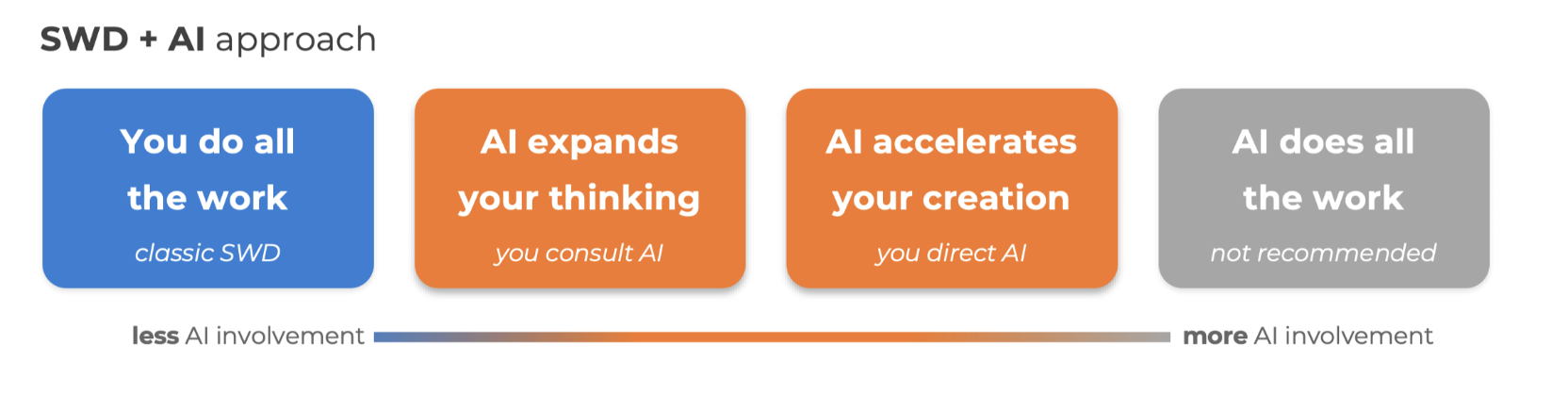
Where AI fits in the data storytelling process
AI can contribute at each stage, but the student stays accountable for the work. That’s the standard to hold across any of the stages in the SWD process.
| Stage | Student responsibility | AI can help with | Ways to try this |
|---|---|---|---|
| Understand context | Defining their audience and what's at stake, crafting their Big Idea, and determining how the insights will be shared | Pressure-testing the framing and surfacing angles they missed | Have students share their Big Idea with AI and ask what's missing based on the Big Idea lesson Assignment: Start with context |
| Craft the story | Building a narrative arc in a low-tech way, based on their own ideas | Testing whether their story shape has tension and a clear narrative arc structure | Have students share their storyboard with AI and ask whether the arc holds: evaluating the tension, identifying gaps, and flagging places where the story loses momentum Assignment: Craft a story |
| Choose a visual | Picking the chart type based on the established context and drafting a visual | Prototyping 2–3 visual options so students can compare chart types | Ask AI to generate 2–3 alternate visuals for a given dataset and see how the message shifts Assignment: Choose an appropriate visual |
| Design & refine | Building the final graph and slides themselves | Critiquing a draft for clutter, fit, and audience resonance | Share visuals with AI for critique, and use judgment to apply the AI suggestions that make sense for the given scenario Assignment: Design effective graphs and slides |
| Present | Delivering the final presentation with clarity, confidence, and in a way that lands with the audience | Role-playing a skeptical stakeholder to refine talking points or helping prepare for a presentation | Before presenting, have students use AI to role-play as a stakeholder by thinking of questions or counterarguments that might surface Assignment: Present powerfully |
One of the most useful things AI can do is serve as a “practice audience” to help students prepare for presentations or to share their data visuals with others. This scenario occurs frequently in business, so learning how to partner with AI in this way is a critical skill to build. Students can ask AI to respond as a specific person, such as a busy executive, a skeptical peer, or someone reading the slide with no presenter in the room, and see what lands. You’ll find this in Assignments 4 and 5.
Two cautions to share with students:
1. AI tends to agree with what it’s given, so ask it to push back.
2. AI only knows the audience through what it is told. Treat it as practice, not a replacement for feedback from real people.
Use AI as a model audience
How the assignments are structured
Each assignment below follows the same format. It opens with the stage it supports, approximate timing (adjust as needed to fit into your course), and an overall goal. You will then see suggested learning materials for students taken from the storytelling with data books, blog, Youtube channel, and podcast that will teach students the foundational concepts before they complete the assignments. We recommend choosing 1 or 2 of these resources to assign as pre-work. Finally, students will need an example to work from in each assignment, so we provide a few options that are safe to share with AI. You can also use your own.
The numbered steps walk you through running the assignment with your students, from the work they do on their own to how they partner with AI. Sample prompts sit under the steps they belong to. Treat these prompts as examples, not scripts. Try your own variations, and encourage students to do the same: rephrase a prompt, ask follow-up questions, and take the conversation further than the sample does. Each assignment ends with what students submit and what to look for when you evaluate their work. These are starting points. Add, cut, or adjust steps to fit your course and your students.
Optional: Consider having students share the SWD + AI Primer with their AI tool at the start of each conversation. The primer summarizes the timeless principles taught in the SWD books and gives AI guidance for applying those lessons thoughtfully. Students can upload the file or, if their tool doesn’t support uploads, paste in the sections most relevant to their task.
Set expectations up front
Before students use AI on any assignment, agree on a few ground rules. Your university’s policies come first; and these can be a starting point:
1. Be open about AI use. Ask students to note where and how they used AI in anything they submit. The goal is to make their thinking visible, so you can see where AI helped and how they relied on their own judgment.
2. Protect the data. Anything students paste into an AI tool can be used to train the LLM. Have them use public or practice datasets, like those in storytelling with data: Let’s Practice!, and never share personal, confidential, or proprietary information. If they’re working with real data from an employer or research project, have them check the rules for that data first.
3. Check for hallucinations. AI can sound confident and still be wrong. It may misread data, invent details, or fill gaps with assumptions. Students should verify anything they plan to use.
4. Own the final work. AI can suggest, but students decide. If they can’t explain why something is in their work, it isn’t theirs yet.
Tool usage: Students won’t all use the same AI tool, and tools differ in what they can do. Some free versions can’t read uploaded files, create charts, or hold a long conversation. Before assigning an activity, try it yourself in the tool your students are likely to use. If a step doesn’t work, adjust it.
Sample Assignments
Each assignment corresponds to a row in the table above and starts with a blog post related to using AI at that stage. They’re standalone: use one, several, or all five, depending on where AI fits into your course. Treat these assignments as starting points you can adjust as you and your students learn.
Assignment 1: Start with context
Goal: Students craft a Big Idea on their own, then use AI as a thought partner to make it sharper.
Suggested learning materials for students (pick 1–2):
- Read: Chapters 1 & 2 from storytelling with you and the what's the Big Idea blog post explain the Big Idea concept. Also have students read SWD + AI: start with context before class
- Watch: Audience matters
- Listen: podcast episode 37: it's for THEM
Potential examples: The Big Idea exercises in Chapter 1 of Let's Practice! (see the supplementary downloads), the what's the Big Idea? exercise, or the Big Idea for your project exercise. You can also use your own example.
Assignment
- Assign the example (5 min). Give students the scenario they'll work with, from the list above or one of your own. Ground students in the Big Idea concept by briefly reviewing what they learned from reading, watching, or listening to the suggested materials.
- Draft the Big Idea without AI (8–10 min). Have students complete the Big Idea worksheet on their own. If the concept is new to them, have them discuss their drafts with a partner or small group.
- Share context with AI (5 min). Have students open their AI tool and share these details from their worksheet, or upload the worksheet itself:
- Who the audience is and what they care about
- What's at stake
- What the audience should know or do
- How the work will be shared: live, or read on its own
- Ask AI to question them first (10 min). Have students ask AI for clarifying questions before it offers suggestions. If AI jumps to a solution, that's a sign it needs more context.
Sample prompt:"Here is my Big Idea and the context behind it. Before suggesting any changes, ask me questions to help me clarify it."
- Pressure-test the Big Idea (10 min). Have students ask whether their Big Idea states a clear point of view and conveys what's at stake for the audience.
Sample prompt:"Does my Big Idea state a clear point of view? Does it convey what's at stake from my audience's perspective? Suggest 2–3 crisper versions that keep my original intent."
- Evaluate and revise (15 min). Have students flag any assumptions AI made about their audience or situation and check whether they're accurate. Then have them revise their Big Idea, keeping only the suggestions that fit.
How to evaluate
What students submit: Their original Big Idea, the prompts they used, their final Big Idea, and a few sentences on what changed and why.
What to look for: A Big Idea that is a single sentence, framed from the audience's perspective (not the student's), and evidence that the student pushed back on AI's assumptions, using it as a source of feedback rather than taking its ideas directly. For additional guidance on facilitating a Big Idea assignment, see exercise 9.7 in let's practice!
Download Assignment 1 (PDF)Assignment 2: Craft a story
Goal: Students storyboard by hand, then use AI to test whether their story follows a narrative arc, holds tension, and is likely to engage an audience.
Suggested learning materials for students (pick 1–2):
- Read: Chapter 4 from storytelling with you and the structures of story and how I storyboard blog posts explain the storyboarding/story structure concepts. Also have students read SWD + AI: craft a story.
- Watch: Use sticky notes to improve your next presentation
- Listen: podcast episode 2: what is story? and podcast episode 45: the power of post-its
Potential examples: Students can keep working from their Assignment 1 scenario. The storyboard YOUR project exercise or Exercise 1.15 in Let's Practice! also works well.
Assignment
- Storyboard by hand (10–15 min). Provide students with a brief overview of the storyboarding process that is covered in the suggested material to ensure everyone starts with the foundational knowledge on the storyboarding process. Then have students brainstorm ideas on sticky notes, keep what best supports their Big Idea, and arrange them into a narrative arc. Use sticky notes and pens to keep this step low tech.
- Share the storyboard with AI (5 min). Have students share the structures of story blog post (see above), a few details about their audience, and a photo of their storyboard.
- Check the arc (10 min). Have students ask whether their story has a clear plot, twists, and ending, with enough tension to captivate the audience throughout the presentation.
Sample prompt:"Here's a photo of my storyboard. Does it follow a clear narrative arc with a plot, twists, and an ending? Where does the tension build, and where does it fall flat?"
- Find the weak spots (10 min). Have students ask where the story has gaps, takes detours, or loses momentum. AI should point out issues, not rewrite the story.
Sample prompt:"Help me identify gaps, inconsistencies, or places where the story loses momentum. Don't rewrite it. Give me suggestions on what to reconsider."
- Decide what stays (15 min). Have students decide what to add, cut, or reorder, and note why. They make the final call, not AI.
How to evaluate
What students submit: A photo of their original storyboard, the prompts they used, their revised arc, and a short note on what changed and why.
What to look for: A final structure that follows a narrative arc, with changes the student can explain in their own terms.
Download Assignment 2 (PDF)Assignment 3: Choose an appropriate visual
Goal: Students use AI to prototype a few chart options quickly, then choose and build the one that best fits their message.
Suggested learning materials for students (pick 1–2):
- Read: Chapter 2 from storytelling with data to understand how to choose an appropriate visual. Also have students read SWD + AI: choose an appropriate visual before class. They can also reference the chart guide for explanations of chart types.
- Watch: graphing data
- Listen: which graph should I use?
Potential examples: Exercise 2.12 (which graph would you choose?) from the Let's Practice! downloads, or a dataset from the before & after graph downloads.
Assignment
- Set the takeaway (5 min). Have students decide what they want to communicate from the dataset and who their audience is. This can be taken directly from Assignment 1 if they have already completed it.
- Generate prototypes (15 min). Have students share the data, takeaway, and audience with AI and ask for 2–3 chart options. These are quick prototypes to compare, not finished designs. If their tool can't create charts, have them ask AI to describe each option and sketch them by hand.
Sample prompts:"Here is my data and the takeaway I want to communicate. My audience is [add details]. Suggest 2–3 chart options that could work, favoring common types like bar charts or line graphs."Then: "Tell me why you recommend each option and when I might choose it."
- Check against the data (10 min). Before comparing options, have students check each prototype against the source data. Are the values, labels, and scales correct?
- Compare the options (10 min). Have students rate each option on familiarity (is it a common chart type?), clarity, and fit for the audience.
- Build it themselves (20 min). Have students choose a chart type and build the final version in the tool of their choice, rather than using AI's output. This is where they practice making intentional chart choices based on what they know about their audience.
How to evaluate
What students submit: All AI-generated prototypes, their final chart, and a short rationale explaining their choice and how it differs from what AI gave them.
What to look for: A clear connection between the takeaway and the chart they chose.
Download Assignment 3 (PDF)Assignment 4: Design effective graphs and slides
Goal: Students ask AI to critique a visual they built, then decide which suggestions to apply.
Suggested learning materials for students (pick 1–2):
- Read: Chapters 3 & 4 from storytelling with data to understand why decluttering and focusing attention are essential steps in the data visualization process. Also have students read SWD + AI: design effective graphs before class.
- Watch: can AI tell a better data story?
- Listen: podcast episode 65: emphasize it
Potential examples: Exercise 2.11 (improve this visual) in Let's Practice!, or a "before" graph from before & after. The makeovers page has more examples.
Assignment
- Choose a visual (5 min). Have students bring the chart they built in Assignment 3, another visual they made, or a "before" graph from the examples. Ground students in the core concepts of decluttering and focusing attention.
- Ask AI for a critique (15 min). Have students share the visual, their audience, and how it will be shared (live presentation, offline distribution, etc.). Have them ask for feedback on four things: what can be removed, where attention goes first, whether the title describes what's shown, and whether the labels and annotations make the point clear.
Sample prompt:"Look at this graph through the lens of [audience], with no one presenting it. What do you notice first? What do you think I want you to know or do? What could I remove or simplify? Where could the words, hierarchy, or design be clearer?"
- Parse the feedback (10 min). Have students sort AI's suggestions into keep, change, or reject, with a reason for each. Watch for suggestions that strip out context the audience needs.
- Revise it themselves (20 min). Have students apply the changes in their own tool. If they started from a "before" graph, have them compare their version to the published "after."
How to evaluate
What students submit: Their original and revised visuals, plus a short reflection on which of AI's recommendations they adopted, which they rejected, and why.
What to look for: Students who can justify each design choice, including the ones where they overrode AI. Grade the reflection, not just the final graph. Be wary of students who accept every removal AI suggests. Good decluttering keeps the context the audience needs.
Download Assignment 4 (PDF)Assignment 5: Present powerfully
Goal: Students use AI as a practice audience to anticipate tough questions and sharpen their talking points, then rehearse with real people. Before the assignment, students should have a draft slide deck for a data-driven presentation they have developed.
Suggested learning materials for students (pick 1–2):
- Read: Chapters 9 & 10 from storytelling with you to learn tips for presenting effectively. Also have students read SWD + AI: present powerfully and data storytelling in the age of AI before class.
- Watch: #1 tip for better presentations video
- Listen: podcast episode 70: prepare to present
Potential examples: Having students choose their own example or use the example they have used for previous assignments is best for this one. Alternatively, students can complete this community practice exercise, and use that for this assignment.
Assignment
- Share the presentation with AI (5 min). Have students share their slides, speaker notes, and details about their audience.
- Role-play a skeptic (15 min). Have students ask AI to play a doubtful audience member, such as an executive, a skeptical coworker, or a prospective client. AI tends to agree, so have them ask it to push back.
Sample prompt:"Assume the role of [audience] who doubts my recommendation. Ask me your three hardest questions, one at a time, and react to my answers."
- Test the assumptions (10 min). Have students ask AI to name the assumptions their argument relies on and challenge them.
Sample prompt:"What assumptions does my recommendation rely on? Challenge the weakest one."
- Refine the talking points (15 min). Have students ask AI whether their speaker notes are clear, the transitions are smooth, and the points will keep the audience engaged.
Sample prompt:"Evaluate my talking points. Where might my slide transitions lose you, or where are you likely to disengage? Point out any talking points that are confusing or too long."
- Practice with people (15 min). AI can't watch students present. Pacing, eye contact, and handling a real question still take live practice. Have students do a dry run in front of classmates, or record themselves and watch it back three ways using this practice exercise.
How to evaluate
What students submit: A short summary of the toughest critique AI raised and how they revised their talking points.
What to look for: A revision that addresses the substance of the challenge, not just the tone.
Download Assignment 5 (PDF)Consider an AI log
Whichever assignments you use, students can keep a running AI log noting what they kept, changed, or rejected, and what they double-checked, with a brief reason for each. At the end of the course, ask them to reflect on where AI was most useful and where human judgment mattered most.
Collaborate with fellow instructors
AI changes quickly, and so will the ways you use this guide. One of the best ways to find new approaches is to see what’s working in other classrooms. Join the instructor community conversation to share how you’re incorporating these assignments into your course, post new ideas, and ask questions. Your ideas will shape future versions of this guide, including new assignments and examples.